What Is a Video Wall? Types, Technology, and How They Work
2 minute read | Updated July 31, 2026
Walk into the lobby of a Class A office tower, a hospital atrium, or a transit concourse today, and there's a good chance the first thing that catches your eye isn't the architecture — it's the display. Video walls have become one of the defining features of premium, well-managed properties, giving owners and property managers a single, flexible canvas to welcome visitors, direct foot traffic, showcase tenants, and reinforce a building's brand from the moment someone steps through the door.
For developers, property managers, and facilities teams evaluating a video wall for the first time, the terminology can feel like a foreign language: LCD, LED, dvLED, pixel pitch, bezel width, rear-projection cubes. The good news is that the underlying decision is simpler than it sounds. Every video wall technology is built to solve the same core challenge — creating a large, bright, seamless visual surface — and each approach brings its own strengths to different spaces, budgets, and viewing conditions.
This guide breaks down what a video wall actually is, how the three primary technologies (LCD, LED, and rear-projection) work, and how commercial real estate owners can match the right technology to their property's goals. If you're planning a lobby refresh, a wayfinding upgrade, or a new build, understanding these fundamentals is the first step toward a display that elevates the tenant and visitor experience for years to come.
What Is a Video Wall?
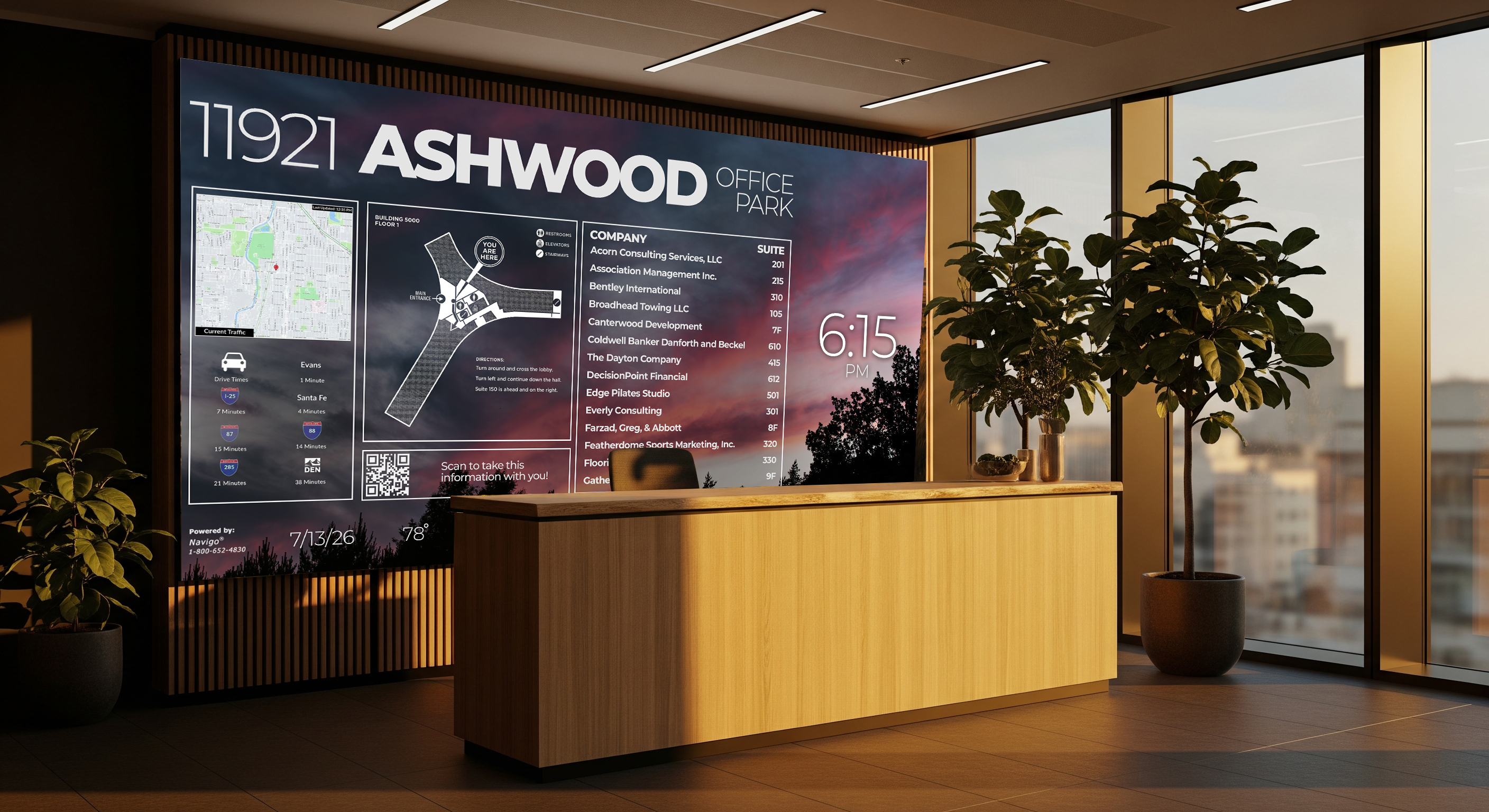
A video wall is a large-format display made up of multiple screens, panels, or projection units tiled together and driven by a single processor so that they function as one unified visual surface. Rather than installing one oversized television, a video wall combines smaller display units — LCD panels, LED tiles, or projection cubes — into a mosaic that can be scaled to nearly any size or shape a space calls for.
That flexibility is exactly why video walls have become a go-to amenity for commercial office lobbies, healthcare facilities, transit hubs, stadiums, and mixed-use developments. A video wall can be configured as a single dramatic focal point above a reception desk, a wraparound wayfinding display in a multi-tenant lobby, or a modular grid that scales across an entire concourse. The content — building directories, tenant announcements, wayfinding maps, brand storytelling, real-time transit data — can be zoned, scheduled, and updated centrally, giving property teams a communication tool that's as dynamic as the businesses operating inside the building.
Three underlying technologies make this possible, each with a distinct approach to producing that seamless image.
LCD Video Walls: The Established, Cost-Effective Standard
LCD (Liquid Crystal Display) video walls are built from multiple commercial-grade LCD panels mounted in a grid — often 2x2, 3x3, or larger configurations — that work together to form one continuous display. These panels operate 24/7 at high brightness and are engineered with thin bezels that create a clean, seamless look when placed side by side.
Because LCD panels were purpose-built for video wall use, they tend to offer ultra-thin bezels, both portrait and landscape mounting options, and processors designed for continuous, all-day operation, making them the dominant choice for indoor commercial environments. Even the narrowest bezels on the market today do leave a faint seam between panels — modern LCD bezels typically run 0.9 to 1.8 millimeters per side, meaning about 1.8 to 3.6 millimeters of visible line between adjacent screens. In most lobby, directory, and wayfinding applications, that seam is virtually unnoticeable at normal viewing distances and doesn't detract from the experience.
Where LCD truly shines is up close. Modern 4K LCD displays pack in more than 8 million pixels, delivering highly detailed, crystal-clear content that holds up even when a viewer stands less than a foot from the screen — an important consideration for building directories, wayfinding kiosks, or any application where visitors will read fine text or detailed graphics at close range.
LCD also tends to be the more budget-efficient path for smaller-to-mid-size installations. Because LCD walls are built from commercial LCD panels, pricing is often lower than an LED wall configured to achieve a comparable pixel density, and for walls viewed at typical lobby distances, LCD is generally the more cost-effective option. Energy use follows a similar pattern: a typical 55-inch commercial LCD panel consumes around 250 watts at peak brightness, notably less than comparable LED cabinets, which draw 400 to 800 watts per square meter — a meaningful consideration for properties tracking building-wide energy performance.
Best fit for: Corporate lobbies, building directories, meeting room and elevator screens, and any application where close-up viewing, detailed content, and cost efficiency are priorities. Explore how these are deployed across our digital building directory solutions and elevator screen installations.
LED Video Walls: Seamless, Scalable, and Built for Impact
LED (or direct-view LED, often abbreviated dvLED) video walls take a fundamentally different approach. Instead of tiling complete panels with glass and backlighting, LED video walls are built from panels containing individual light-emitting diodes with no glass or color filter layer, and each pixel emits its own light directly rather than modulating a backlight. The panels, or cabinets, tile together with extreme precision, creating a seamless image surface with no structural seams at any scale.
That seamlessness is LED's signature advantage. Because LED video walls are built from connected modules rather than framed panels, the finished wall can appear as one continuous canvas with no visible bezel lines interrupting the image — a look that's especially valuable for large, dramatic installations meant to command a lobby, atrium, or stadium concourse. LED also scales further than LCD: temporary LCD configurations typically top out around five panels across and five high, while LED walls can be extended to virtually any size, from a modest reception display up to installations spanning hundreds of feet — the Suzhou Sky Screen in China, for reference, stretches roughly 1,640 feet.
LED's other advantage is longevity in continuous operation. Direct-view LED displays are typically rated to around 100,000 hours before reaching 50% of initial brightness, compared to roughly 50,000 to 70,000 hours for LCD backlights — a difference that becomes more visible the longer a wall runs 24/7. LED's self-illuminating pixels also deliver higher color saturation and more vivid imagery, amplifying the visual impact of brand and advertising content.
The trade-off is viewing distance. LED display quality is governed by pixel pitch — the distance between individual LED clusters — and pitch needs to match how close viewers will actually stand. A commonly used industry formula estimates minimum comfortable viewing distance in feet as roughly three times the pixel pitch in millimeters, though achieving a crisp image at a 12-foot viewing distance generally calls for a pixel pitch of around 1 millimeter or finer. Fine-pitch LED has closed much of that gap in recent years — today's fine-pitch dvLED solutions, typically in the 0.9 to 1.2 millimeter range and below, can comfortably support the closer viewing distances found in most lobby and control-room environments when properly specified — which is why LED has become viable for an increasingly wide range of commercial spaces, not just large-format or outdoor applications.
Best fit for: Large-format lobby installations, stadium and venue displays, transit concourses, outdoor signage, and any space where scale, brand impact, and seamless imagery are the priority. See how this plays out in our video wall solutions and outdoor digital signage installations, including recent ruggedized deployments across Pacific Northwest transit environments.
Rear-Projection Video Walls: The Mission-Critical Veteran
The third category, rear-projection cubes, represents the most established video wall technology, historically favored in control rooms, utility operations centers, and other mission-critical environments. For more than two decades, DLP-based rear-projection cubes — typically in 50- to 80-inch diagonal components — have served as one of the three foundational video wall technologies.
Rear-projection cubes work by projecting an image from behind a rear-facing screen within each cube, then tiling multiple cubes together into a grid. Because the different colors converge onto the same spot on the screen rather than appearing as visible sub-pixels, projection cubes can produce an image with no visible pixel structure up close, and their seams between cubes can be made very small. Modern rear-projection solutions, including LED-lit and laser-illuminated DLP systems, are designed for 24x7 mission-critical operation, offering stable colors, low power consumption, and uninterrupted performance over long service lives.
Rear-projection's principal trade-off is physical footprint. The depth of each cube and the need for rear access for maintenance typically requires a minimum of six feet of space behind the screen, and considerably more for very large walls, which may require a motorized lift for servicing. That footprint requirement, combined with LED's rapid gains in price and pixel density, has led many mission-critical facilities to transition toward fine-pitch LED for new installations — though rear-projection systems already in place continue to operate reliably and support mission-critical functions effectively for the properties that rely on them.
Best fit for: Legacy control rooms, utility operations centers, and mission-critical monitoring environments where an existing rear-projection investment continues to perform well, or where space behind the display is not a constraint.
Choosing the Right Technology for Your Property
For most commercial real estate applications — office lobbies, retail and mixed-use common areas, healthcare reception, schools, and transit hubs — the decision typically comes down to LCD versus LED, and the right answer depends less on which technology is "better" and more on how the space will actually be used:
How close will people stand? Directories and wayfinding kiosks read at arm's length favor LCD's pixel density; large-format lobby or stadium walls viewed from a distance are ideal territory for LED.
What's the footprint and shape? LCD is efficient for standard rectangular grids up to a moderate size; LED scales to virtually any dimension or custom shape, including curved and non-rectangular canvases.
Indoor or outdoor? Outdoor and high-ambient-light environments generally call for LED's higher brightness output and weather-rated hardware.
What's the intended visual statement? A seamless, edge-to-edge LED canvas makes a bold brand and design statement in a flagship lobby or public venue; LCD delivers excellent value and clarity for information-dense, close-viewing applications.
None of these are trade-offs in the negative sense — they're simply different tools optimized for different moments in the tenant and visitor journey. A property might well use both: an LCD directory board for wayfinding near the entrance, paired with a large LED canvas as the architectural centerpiece of the lobby.
Video Walls as a Strategic Property Investment
For developers and property managers, a video wall is far more than a display — it's a communications platform that scales with the building. The same canvas that welcomes a visitor in the morning can promote a tenant event by afternoon and display real-time wayfinding or emergency information when it matters most. Done well, it signals to prospective tenants and their clients that a property is investing in the experience, not just the square footage.
That's the thinking behind Navigo® by ITS, Inc. Since 1999, we've helped commercial office towers, healthcare systems, transit authorities, and mixed-use developments across the US and Canada design and deploy video wall solutions that fit the building first and the technology second — from LCD directory boards to large-format LED lobby installations, all managed through a single cloud-based content platform. You can see how these solutions come together across our industries page, including corporate offices, healthcare, and retail and mixed-use properties, and browse examples of completed installations in our portfolio.
The Bottom Line
Ready to explore what a video wall could do for your property? Whether you're planning a lobby refresh, a new development, or a wayfinding upgrade, the Navigo® team can help you evaluate the right technology, size, and content strategy for your space.
Connect with us today.
Frequently Asked Questions
What is the difference between an LCD and an LED video wall?
The core difference comes down to how each technology produces light. An LCD video wall is made up of multiple LCD panel monitors mounted together to create a single unified canvas, each with a backlight and thin bezels that create a seamless look when tiled. An LED video wall, by contrast, uses direct-view LED pixels that emit their own light rather than relying on a backlight, allowing cabinets to tile together with sub-millimeter precision and no structural seams. In practical terms, LCD tends to be the more budget-efficient, detail-rich choice for close viewing, while LED is built for scale, brand impact, and a fully seamless visual surface.
Are video wall bezels noticeable to visitors?
On modern LCD panels, the bezel is minimal but not entirely invisible. Even the thinnest commercial LCD bezels today measure roughly 0.9 to 1.8 millimeters per side, creating a visible line of about 1.8 to 3.6 millimeters between adjacent panels. At normal lobby or directory viewing distances, this line is unobtrusive and doesn't interfere with legibility. For properties that want a fully unbroken image — for example, a large architectural feature wall — an LED video wall eliminates the bezel entirely, since its connected display modules form one continuous surface with no visible seams.
How close can people stand to a video wall before the image looks pixelated?
This depends on the technology and its pixel pitch (the spacing between individual pixels or LED clusters). A commonly used industry formula estimates minimum comfortable viewing distance in feet as roughly three times the pixel pitch in millimeters. LCD panels are generally the most forgiving for close viewing — modern 4K LCD displays contain more than 8 million pixels, keeping content crisp even from less than a foot away. Fine-pitch LED has closed much of this gap for lobby-scale applications: today's fine-pitch dvLED solutions, often 0.9 to 1.2 millimeters and below, can comfortably support the closer viewing distances typical of lobby and reception environments when properly specified.
Which is more cost-effective — LCD or LED?
For most standard-size commercial installations viewed at typical lobby distances, LCD tends to be the more economical option. Because LCD walls are built from commercial LCD panels, pricing is often lower than an LED wall configured for a comparable pixel density, particularly for walls viewed at a consistent, moderate distance. That said, the cost gap between the two technologies has narrowed considerably in recent years, particularly in the 3 to 7.2 square meter range common in lobbies, boardrooms, and reception areas — which means the right choice increasingly comes down to the visual outcome a property wants, not budget alone. Our team can walk through sizing and configuration options as part of your video wall solution planning.
How much space does a video wall need behind the display?
This varies significantly by technology. LCD and LED video walls are both designed for shallow, wall-mounted installations, often just a few inches deep. Rear-projection cubes require considerably more room: the physical depth of each cube and the need for rear access typically requires a minimum of six feet of clearance behind the screen, and often more for larger installations, which may call for a motorized lift during servicing. For properties without that depth available — which describes most modern lobbies and reception areas — LCD or LED is generally the more space-efficient path.
How long does a video wall typically last?
Video wall lifespan is usually measured by how long it takes a display to reach 50% of its original brightness under continuous use. Direct-view LED displays are typically rated to approximately 100,000 hours to reach that threshold, while LCD backlights are rated to roughly 50,000 to 70,000 hours for the same benchmark. In real-world terms, that's a long runway either way — decades of service for a typical business-hours operating schedule — and with proper maintenance and a trusted service partner, both technologies are well suited to the always-on demands of a commercial lobby or directory.
Can a video wall be used outdoors?
Yes, though the technology and hardware enclosure matter. Outdoor and high-ambient-light environments call for displays engineered for higher brightness output and weather resistance, which is why LED is the preferred technology for most outdoor and transit applications. Our outdoor digital signage solutions are built specifically for these conditions, including ruggedized deployments across demanding climates like the Pacific Northwest.
How is content managed across a video wall?
A well-designed video wall isn't just hardware — it's paired with a content management platform that lets property teams schedule, zone, and update visuals from anywhere. With Navigo®, a single cloud-based dashboard can control everything from building directories and wayfinding to tenant announcements and brand storytelling, all displayed seamlessly across the wall. Learn more about how this works across our digital signage solutions.
Contact us today to learn more about Navigo® for your property.