

Headquarters
7150 Columbia Gateway Drive, Suite L, Columbia, MD 21046
New York Location
112 West 34th Street, 18th Floor, Room 18025, New York, NY 10001
Proud Member


A visitor's trip from the sidewalk to a seat in a conference room takes a few minutes and passes through six decision points. The office building visitor journey looks very different from the management office: those same few minutes arrive as a call to the front desk, a tenant asking why their client was sent to the eleventh floor instead of the twelfth, or, when the building is working properly, as nothing at all.
The traffic behind those minutes is worth understanding. JLL's Global Occupancy Planning Benchmark Report 2026, published in May 2026 from 84 organizations representing 716 million square feet, found that 62% of organizations now require a fixed number of in-office days, up from 49% a year earlier, and that 70% of employees are now in the office three to five days a week. The largest single-year shift in three years of that benchmark was in midweek presence: the share attending three to four days a week rose from 36% to 55%. Those figures measure employee attendance rather than third-party visitor arrivals, so they are not direct evidence that more guests are arriving in the lobby. What they do establish is that building activity is becoming more structured and more concentrated on particular days, which is reason enough to look at how a lobby performs in its busiest hours.
So the arrival experience is worth walking deliberately. What follows is the journey in six moments, in the order a visitor meets them, with three things named at each step: what the visitor does, what it takes off the building team's desk, and what has to be true underneath for it to work.
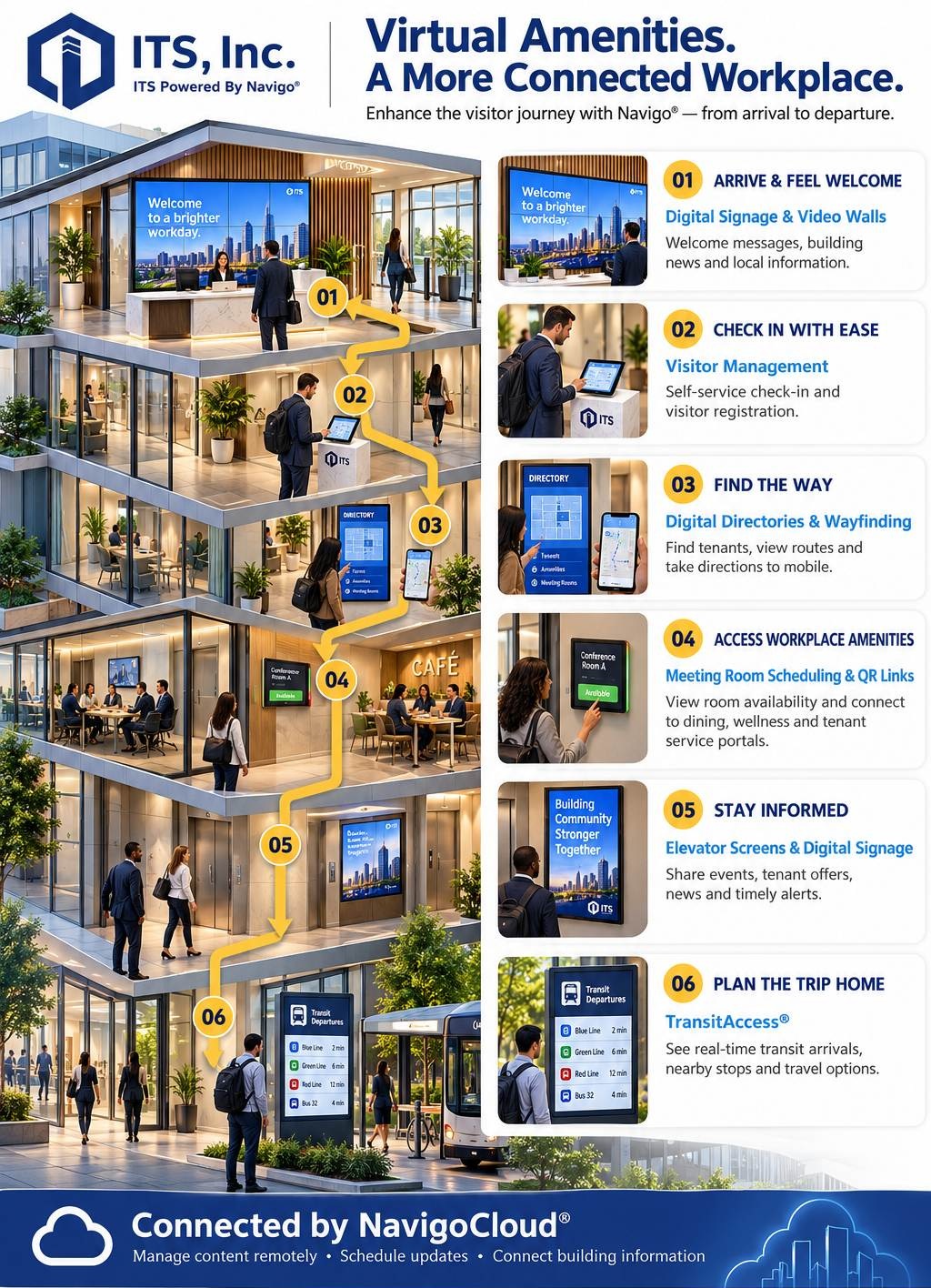
A visitor sees a sequence. A property manager sees six opportunities for a question to be answered by the building or escalated to a person.
That is the whole frame. Every moment below resolves itself or becomes an interruption, and the interruptions are not evenly distributed. They cluster at 8:45 on a Tuesday, when three deliveries, a candidate interview and a tenant's client all arrive inside the same ten minutes. The building either absorbs that or the front desk does.
The six moments are arrival, check-in, finding the way, reaching an amenity or a meeting room, staying informed while in the building, and leaving. Each has a surface someone touches and a record behind it that someone owns. Some of these moments belong mostly to first-time visitors. Others, including amenity access, building news and transit information, are used more often by tenants and employees. Few people meet all six in a single trip, but together they shape how a building feels from arrival to departure.
What the visitor does. Walks in, looks for a cue, and decides within seconds whether this building expects them. A welcome message, the building's name, today's events, and local information all answer the unasked question of whether they are in the right place.
What it does for the building team. Lobby digital signage and video walls carry the announcements that would otherwise reach tenants as email nobody opens: elevator maintenance, a lobby closure, a change to loading dock hours. Published centrally, they reach everyone standing in the lobby, which is a different and often better audience than a distribution list.
What has to be true underneath. Someone owns the content calendar. A welcome screen showing last month's event is worse than a blank wall, because it is evidence that nobody is looking. Scheduling content by daypart and by property, rather than editing screens individually, is what keeps that from happening across a portfolio.
What the visitor does. Identifies themselves. In a connected building that can be a QR code from a confirmation email, an ID scan, or a name typed at a kiosk, with a badge issued and the host notified automatically.
What it does for the building team. This can be a frequent source of front desk work in a traditional lobby, because it is where a paper log, a phone call upstairs and a hand-written badge all live. A visitor management system moves the routine cases off the desk: Navigo® supports self check-in and guard-administered check-in, pre-registration with a QR code valid only for the visitor's scheduled date and time, printed or digital badges, and text or email host notifications at check-in. It also produces something a paper book never did, which is a searchable record of entry and exit timestamps for audit and compliance purposes. Which check-in methods, badge options and access control connections are available in a particular building depends on the system as configured and the integrations in scope.
What has to be true underneath. Two things. First, tenants have to actually pre-register, which is a communication and onboarding question, not a software one. Second, if a credential is going to move a visitor through a turnstile or authorize an elevator floor, the visitor system has to feed the access platform of record rather than sit beside it. Navigo publishes integrations with platforms including Genetec, Software House C-CURE 9000, AMAG Technology and Kastle Systems, with the full partner list on the ITS site. How those connections differ from each other is covered in Lobby Directory + Access Control: One System.
What the visitor does. Looks for a tenant name, confirms a floor, and routes themselves to the right elevator bank. On a phone, ideally, so the directions survive past the point where a fixed screen stops helping.
What it does for the building team. A digital building directory paired with interactive wayfinding answers a common lobby question without a staff member. It also removes the slide-in letter board from the maintenance routine, which matters most in buildings whose tenant roster turns over continuously.
What has to be true underneath. The listing has to be right, and that is a data governance question wearing hardware clothing. One authoritative record of tenant names, suites and floors, a defined update path that is triggered by the lease event rather than a monthly review, and one named person accountable for it. A directory makes updates easier to publish. It does not decide who tells you a tenant changed its name. That distinction is worth settling before specification, and it is covered in depth in our piece on the lobby as the visible layer of a building's data.
What the visitor does. Finds the conference room, sees whether it is free, and gets to the café, the fitness floor or the tenant service portal without a tour.
What it does for the building team. Shared conference space and amenity floors are increasingly part of what a tenant is leasing, and a shared amenity nobody can see the availability of is an amenity the building paid for twice. Meeting room scheduling displays at the point of use show status where the question gets asked, and QR links from a lobby or floor screen hand a visitor straight to a dining, wellness or tenant service page rather than to reception.
What has to be true underneath. The room displays have to read from the calendar the tenants actually use, which in practice means Outlook, Google, Exchange or an ICS feed. And the amenity links are configured links: they work because someone set them up and keeps them pointed at live pages.
What the visitor does. Waits. An elevator ride is one of the few moments in a building where someone is standing still with nothing else to look at.
What it does for the building team. Elevator screens and floor-level signage carry building news, tenant offers, event notices and timely alerts to an audience that is already standing still. For emergency and life safety messaging the case is stronger than convenience: a display network that is connected, configured and tested for the purpose can support a coordinated override, so a notice reaches the lobby, the elevator lobbies and the floors together rather than one screen at a time.
What has to be true underneath. Emergency messaging has to work independently of everything else and has to be tested. A screen network that carries an alert is an addition to a building's life safety communications, not a replacement for any part of it, and the override path should be verified at commissioning and then on a schedule. Navigo can consume standards-based alert feeds, including CAP, with instant overrides, which is the mechanism rather than the plan. The plan is the building's.
What the visitor does. Checks, on the way out, whether it is worth walking to the station now or waiting four minutes.
What it does for the building team. Real-time transit information on a digital transit display near the exit is one of the quietest differentiators in a transit-served building and one of the easiest to demonstrate on a tour. It is particularly useful for commuters, and in a transit-served building that is a large share of the people heading out at five o'clock.
What has to be true underneath. A live feed from the transit agency. Navigo TransitAccess® ties into GTFS and GTFS-RT feeds, along with service advisories and arrivals, which means the display is only as current as the agency's own data. Where an agency publishes a real-time feed, the board reflects it. Where an agency publishes schedule data only, the board shows the schedule, and that difference is worth confirming for your specific market before it is promised to a tenant.
Six connected moments is the easy version to describe. Three things decide whether a building gets there.
One authoritative source per record type. Tenant names, suites and floors may legitimately live in a different system from room inventory or amenity information. What matters is that each record type has one system of record, a defined owner, and a way for the other systems to stay in step with it. When a directory spreadsheet, a lease system and a facilities database each hold their own version of the same record, the lobby eventually displays the wrong one.
A named owner. Unclear ownership is one of the reasons a directory goes stale. Naming the person rather than the department is the straightforward part; the update process behind the name still takes staff time and a trigger that fires reliably.
Connections that actually exist. Navigo exposes and consumes standards-based APIs and supports webhooks, SSO through SAML and OAuth, file drops in CSV, ICS and iCal, and middleware. What that buys is information entered once rather than maintained in two places. It does not remove the obligation to maintain the source record, and no integration does.
Accessibility belongs in the base specification. A directory or check-in kiosk has operable parts, which brings clear floor space, reach ranges and operating requirements into play under the 2010 ADA Standards for Accessible Design. Mounting height is the item most often corrected cheaply before installation and expensively afterward, so it belongs in the specification and the site walk, not the punch list. Confirm the requirements that apply to your project with its design and accessibility team.
Visitor data and privacy. A visitor management system may collect names, host information, timestamps and, depending on configuration, photographs or identification documents. Before deployment, decide what will be collected, who can access it, how long it is retained and how it gets deleted. Facial recognition needs separate review, because biometric privacy requirements vary by jurisdiction: the Illinois Biometric Information Privacy Act, for example, requires specified written notice and a written release before covered biometric collection, along with a publicly available retention and destruction policy. Review what applies to your building with legal counsel before enabling a biometric feature.
Four cases come up often enough to name.
The unmanned or after-hours lobby. There is no desk to take the interruption, so the arrival moment carries more weight, not less. Navigo can run as a virtual receptionist: a video greeting, a searchable tenant directory, DirectDial™ audio or video connection to a tenant, self check-in by ID scan or credential entry, and automated door unlock on approval.
The multi-tenant building with competing visitor policies. The base building's turnstiles and elevators are one scope; a tenant's own suite door behind its own access platform is another. Draw the workflow per boundary rather than per building, and write down which platform owns which floors before anyone quotes.
The building whose systems are not on any integration list. Scheduled file drops in CSV or ICS cover more cases than people expect. Ask the question directly, with the platform and its live version named, rather than inferring an answer from a roster.
The building funding this across more than one budget cycle. Nobody buys six moments in a quarter. Sequencing so that each purchase lowers the cost of the next is its own exercise, set out in Building Technology Roadmap: Sequencing 3 Budget Cycles.
ITS has been building lobby technology for commercial property since 1999, from a headquarters in Columbia, Maryland, with installations across the United States and Canada. Navigo® covers all six moments on one platform: signage and video walls, visitor management, directories and wayfinding, room scheduling, elevator screens and TransitAccess®, managed centrally through NavigoCloud®.
The reason that matters is not the length of the feature list. It is that a visitor's six moments are one experience, and the building's systems either share a record or ask the front desk to be the bridge between them.
Whether you are updating one lobby or connecting technology across several properties, we can help you work out which of the six moments your building already covers, which it does not, and what would need to connect to close the gap. You do not need to know which access platform the building runs before you get in touch.
It is the sequence a visitor passes through from the entrance to the exit: arrival and orientation, check-in, finding the right floor and suite, reaching a meeting room or amenity, receiving building information while inside, and leaving. Each step has a surface the visitor interacts with, such as a directory, a check-in kiosk or a transit display, and a building record behind it that someone has to own and keep current.
It moves the routine arrivals off the front desk. Pre-registration, QR or ID check-in, badge issue and automatic host notification handle the visitors who are expected, which leaves staff attention for the exceptions that need judgment. It also produces a searchable record of entry and exit timestamps, which a paper sign-in book cannot provide for audit or compliance purposes.
No. Where credentialing is in scope, the visitor system feeds the certified access platform rather than replacing it, typically by managing and issuing QR codes or barcodes that the access system recognizes for turnstile and elevator access. The security platform stays the authority on who gets in. Confirm the specific platform and its live version with your integrator, because integration depth follows the system of record.
One authoritative source for tenant names, suites and floors, a compatible system that the directory can connect to, and a defined path that is triggered when a lease event happens rather than at a monthly review. Where those conditions are met, information is entered once rather than maintained in two places. Someone still owns and maintains the source record.
It depends on the transit agency. Where an agency publishes a real-time feed in a standard format such as GTFS-RT, a display can show live arrivals and service advisories. Where an agency publishes schedule data only, the display shows the schedule. Confirm what your local agencies publish before a real-time board is promised to tenants.
Four things, in this order: which access control platform the building runs and which floors it covers, who owns the tenant record and how a change reaches them, whether the planned mounting location and interface meet the accessibility requirements that apply to the project, and how long visitor data will be retained and how it gets deleted. Settling those before a quote is written keeps the scope honest and the installation straightforward.

7150 Columbia Gateway Drive, Suite L, Columbia, MD 21046
112 West 34th Street, 18th Floor, Room 18025, New York, NY 10001
Proud Member

7150 Columbia Gateway Drive, Suite L
Columbia, MD 21046
112 West 34th Street, 18th Floor, Room 18025
New York, NY 10001
