

 800.652.4830
Headquarters
7150 Columbia Gateway Drive, Suite L, Columbia, MD 21046
New York Location
112 West 34th Street, 18th floor, Room 18025 New York, NY 10001
Proud Member


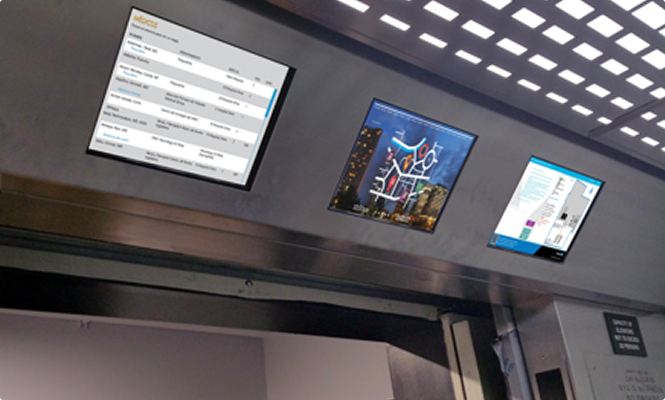
Navigo® Elevator Signage transforms elevators and elevator lobbies into dynamic communication channels. These digital elevator screens deliver real-time information, targeted messaging, and engaging content—enhancing tenant experience while maximizing one of the most viewed spaces in your building.
From commercial offices and hospitals to residential and mixed-use properties, Navigo elevator digital signage modernizes communication and elevates your building’s experience.
Contact us. We’d be happy to answer any questions you have.
Digital elevator screens do more than look sleek—they fundamentally improve how buildings communicate. Powered by Navigo, elevator signage replaces static posters with real-time, centrally managed content that keeps tenants and visitors informed, engaged, and safe.
Whether installed inside elevator cabs or in elevator lobbies, Navigo screens deliver timely information exactly where attention is guaranteed.
As expectations rise, traditional printed signage can’t keep up. Navigo-powered elevator screens allow property teams to communicate instantly and effectively.
With Navigo, you can:
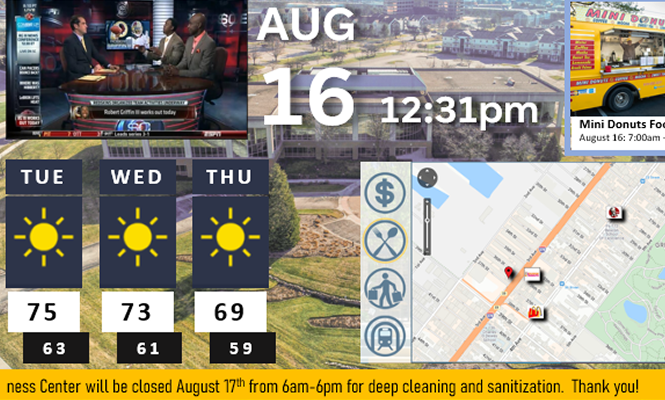
Elevators are high-visibility, high-frequency touchpoints. Navigo elevator signage turns these moments into meaningful interactions.
Key advantages include:
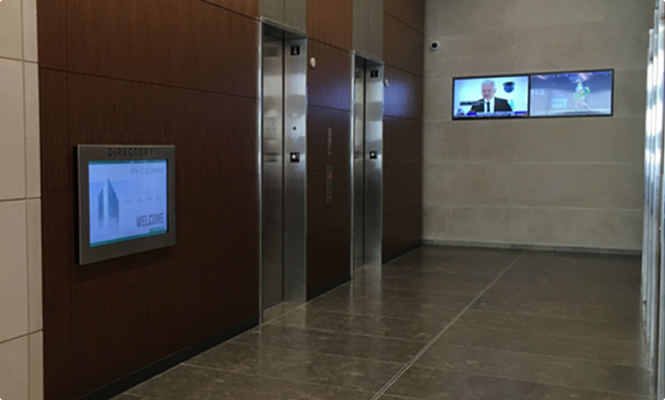
Elevator digital signage refers to digital screens installed inside or near elevators that display dynamic content such as building announcements, news, advertisements, weather updates, live TV, and emergency messages.
Elevator digital signage is a screen-based messaging system placed inside elevator cabs and/or in elevator lobbies/landing areas to deliver short, glanceable content during brief dwell times. Typical hardware includes commercial LCD panels (and sometimes small dvLED) with networked media players connected to a digital signage CMS.
Common content: tenant announcements, wayfinding tips, building policies, weather/time, transit updates, emergency alerts (CAP overrides), and sponsored messages/ads.
Key considerations: power & network to each cab/lobby, mounting and vibration tolerance, ADA/Section 508 readability (high contrast, large fonts), mute-by-default audio, secure content scheduling, remote monitoring, and elevator code/safety compliance.
Benefits: higher message recall (captive audience), micro-messaging in 15–60 sec rides, property branding, revenue via ad inventory, and consistent tenant/visitor communications across the building.
Elevator digital signage enhances tenant communication, improves the visitor experience, and can generate advertising revenue. It also modernizes the building's appearance and can deliver emergency or critical messages instantly.
Elevator digital signage helps properties inform, brand, and monetize in short ride windows:
Improve tenant communication & satisfaction — push announcements, events, policies during captive 15–60s dwell time.
Enhance visitor experience & wayfinding — quick directions, QR hand-offs, lobby/suite pointers reduce front-desk questions.
Strengthen branding & placemaking — consistent brand visuals, tenant recognition, community content in cabs and elevator lobbies.
Safety & emergency readiness — override alerts (CAP), outage notices, service updates, evacuation tips.
Promote amenities & leasing — highlight fitness, EV, conference rooms, retail promos, space for lease.
Generate ad revenue — optional elevator ad network, sponsor spots, proof-of-play reporting.
Operational efficiency — cloud CMS, remote updates/monitoring, daypart scheduling, templates for quick compliance messaging.
Data & accountability — impressions estimates, content analytics, content approval workflows for property teams.
Accessibility & compliance — ADA/Section 508 readable layouts (high contrast, large fonts), mute-by-default audio, code-aware mounting.
Result: higher message recall, smoother tenant/visitor communications, and measurable ROI across office, mixed-use, hospitality, higher-ed, and healthcare properties.
Elevator screens support short, glanceable content optimized for 15–60 second dwell times. Common content types:
Announcements & notices: tenant messages, building policies, outage/service updates
Wayfinding & directories: floor/suite pointers, QR hand-offs to maps
Events & calendars: meetings, community happenings (iCal/ICS feeds)
News, weather, time & date: RSS/headlines, local forecasts, clocks
Transit & traffic: bus/rail arrivals (GTFS-RT), rideshare pickup tips
Elevator screens support short, glanceable content optimized for 15–60 second dwell times. Common content types:
Announcements & notices: tenant messages, building policies, outage/service updates
Wayfinding & directories: floor/suite pointers, QR hand-offs to maps
Events & calendars: meetings, community happenings (iCal/ICS feeds)
News, weather, time & date: RSS/headlines, local forecasts, clocks
Transit & traffic: bus/rail arrivals (GTFS-RT), rideshare pickup tips
Emergency alerts: CAP overrides, evacuation instructions, safety tips
Amenities & promotions: fitness/EV/room booking, retail specials, space for lease
Branding & placemaking: tenant logos, property visuals, community art
Advertising & sponsorships: CPM placements, promos, proof-of-play logs
Dashboards & data: KPI tiles (energy, air quality), Power BI/Tableau embeds
Social & community: moderated social posts, recognition shout-outs
Media formats: images (JPG/PNG), video (MP4/H.264/H.265), HTML5/web pages, tickers
Live sources: IP streams (RTSP/NDI/SRT/HLS), HDMI/SDI inputs, IPTV, camera feeds
Accessibility: large fonts, high contrast, captions/subtitles, mute-by-default audio
Scheduling & layouts: dayparting, split-screen/PiP, multi-zone templates
Emergency alerts: CAP overrides, evacuation instructions, safety tips
Amenities & promotions: fitness/EV/room booking, retail specials, space for lease
Branding & placemaking: tenant logos, property visuals, community art
Advertising & sponsorships: CPM placements, promos, proof-of-play logs
Dashboards & data: KPI tiles (energy, air quality), Power BI/Tableau embeds
Social & community: moderated social posts, recognition shout-outs
Media formats: images (JPG/PNG), video (MP4/H.264/H.265), HTML5/web pages, tickers
Live sources: IP streams (RTSP/NDI/SRT/HLS), HDMI/SDI inputs, IPTV, camera feeds
Accessibility: large fonts, high contrast, captions/subtitles, mute-by-default audio
Scheduling & layouts: dayparting, split-screen/PiP, multi-zone templates
Typically, yes. A stable internet connection is needed for real-time content updates. However, some systems offer offline modes where preloaded content will still display without interruption.
Using Navigo, content can be updated as often as needed or desired allowing for real-time changes and scheduling.
Installation generally involves:
Power supply to the display location
Internet access (wired or wireless)
Space for a wall-mounted or embedded screen
Mounting brackets or custom enclosures (if needed)
Short answer: Yes—securely and automatically.
How it works: Navigo® exposes and consumes standards-based APIs and supports webhooks, SSO (SAML/OAuth), file drops (CSV/ICS/iCal), and middleware/iPaaS to sync the systems you already use.
What you can automate
People & places: Employee/tenant directories, suite assignments, departments, amenities
Scheduling: Room booking and events calendars (Outlook/Google/Exchange/CalDAV/ICS)
Safety: Emergency alerts (e.g., CAP feeds) and service notices with instant overrides
Content ops: Pull from your CMS/DAM and publish to specific screens, zones, or campuses
Governance you can trust
Role-based permissions, approval workflows, and audit logs
Network allowlists, API keys/token rotation, rate limiting, and encryption in transit/at rest
Outcome: One source of truth; no double entry, fewer tickets, faster, compliant updates portfolio-wide.
Absolutely. Navigo® supports integration with public data sources through APIs, including GTFS-based transit feeds, weather services, news tickers, and more. By connecting directly to trusted external data providers, Navigo® ensures your signage delivers accurate, real-time information relevant to your location and audience.
Contact us today to upgrade your current elevator screens or discuss requirements for installing new elevator screens.

Leverage the power of Navigo software to deliver real-time information, simplify navigation, and enhance communication with visitors—all through a cloud-based platform that's easy to manage and update. Create a more welcoming, efficient, and modern environment that leaves a lasting positive impression.
7150 Columbia Gateway Drive, Suite L, Columbia, MD 21046
112 West 34th Street, 18th floor, Room 18025 New York, NY 10001
Proud Member

7150 Columbia Gateway Drive, Suite L
Columbia, MD 21046
112 West 34th Street, 18-025
New York, NY 10001
